You approve · AI executes

The AI-native data pipeline platform.

Describe the sync in plain English. rsync.ai discovers schemas, scans for PII, and runs batch or CDC pipelines once you approve the plan — then turns the data into models, scheduled reports and dashboards. Missing a connector? It builds one on rsync.ai Cloud.

Live on rsync.ai Cloud, or self-host free for internal use — source-available under the rsync.ai Source-Available License. View on GitHub →

No per-row pricingReal-time CDC: Postgres, MySQL, SQL Server & MongoDB
app.rsync.aiConnector ready · 2m 14s
Describe
Generate
Approve
4
Sync
Describe the sync
Sync our internal billing API to Postgres, hourly.
No prebuilt connector — rsync.ai generated one
Parsed the API docs (OpenAPI)
Mapped 12 resources · auth + pagination
Connector generated + deployed
billing_apipostgres
first sync · 4,120 rows
See it in action

One sentence.
A running pipeline.

Watch a plain-English request become a live Postgres→GCS CDC pipeline. You pick the tables, PII is checked before anything moves, every change is captured and applied, and then you ask a question in plain English and get SQL you run yourself. The walkthrough runs about 30 seconds.
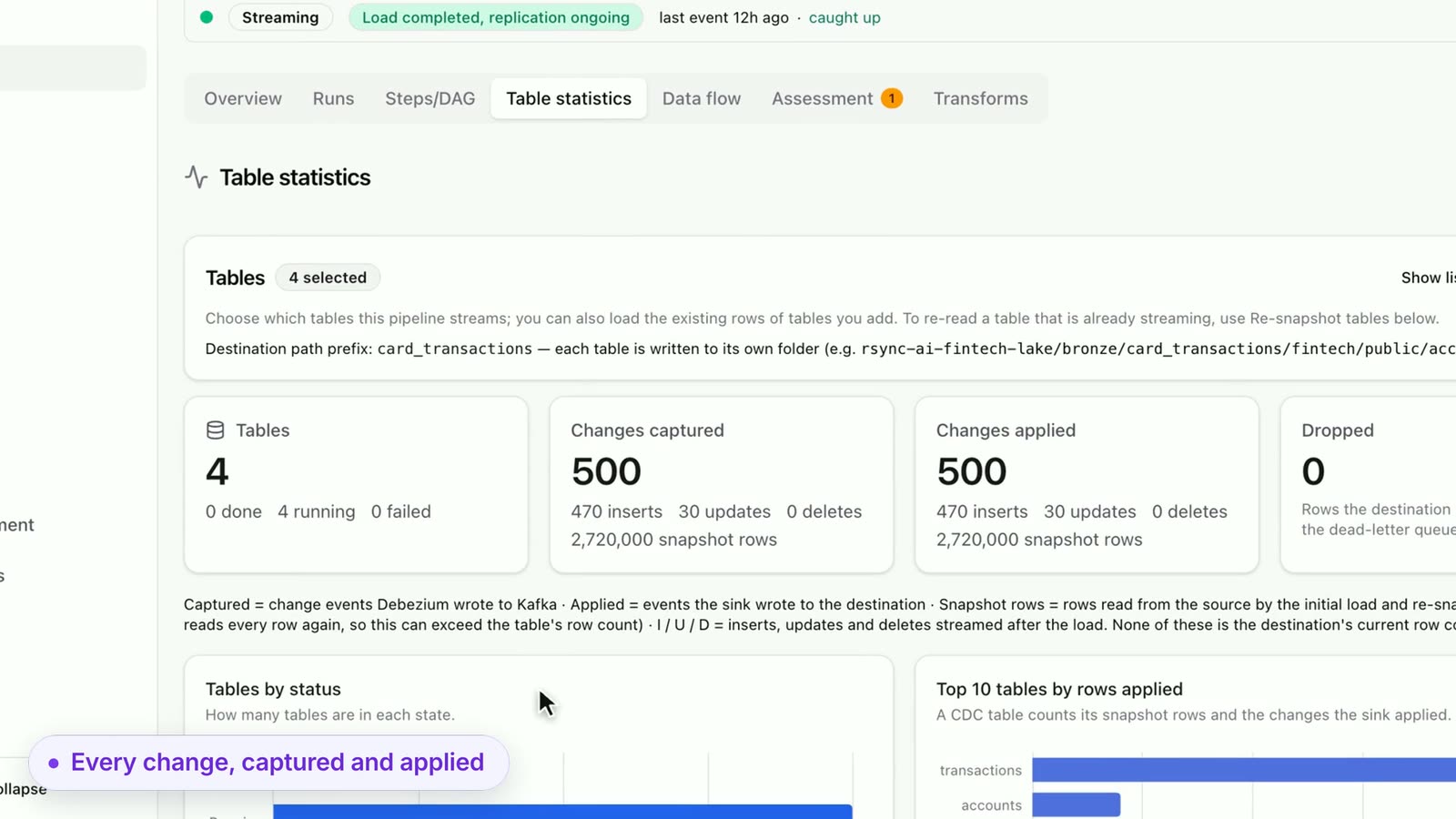
rsync.ai table statistics for a streaming CDC pipeline: 4 tables, 500 changes captured and 500 applied
~30 sec
Describe it in plain EnglishPick tables, PII checked firstEvery change captured and appliedAsk in plain English, get the SQL

The rsync.ai difference

One platform for moving data — instead of stitching together Fivetran, Airflow DAGs, and custom scripts.

New connectorTypical stack: Wait for the vendor to build it, or write and maintain custom code.rsync.ai: Generated in minutes from a REST or GraphQL API's docs or spec.
Pipeline setupTypical stack: Airflow DAGs and glue scripts to write, deploy, and babysit.rsync.ai: Described in plain English, run as durable Temporal workflows — batch or CDC.
PricingTypical stack: Per-row or MAR pricing that's hard to forecast.rsync.ai: Billed per GB moved, no per-row fees — and pipelines pause at your cap.
Safety & controlTypical stack: Changes go live without a review step.rsync.ai: You approve each step. PII is detected and masked, hashed, or dropped per field.
Product tour

What's inside
rsync.ai

Ten surfaces in one workspace: build pipelines, connectors, models and workflows — then chart, dashboard and ask questions of what they produce.

Start with a question, not a form

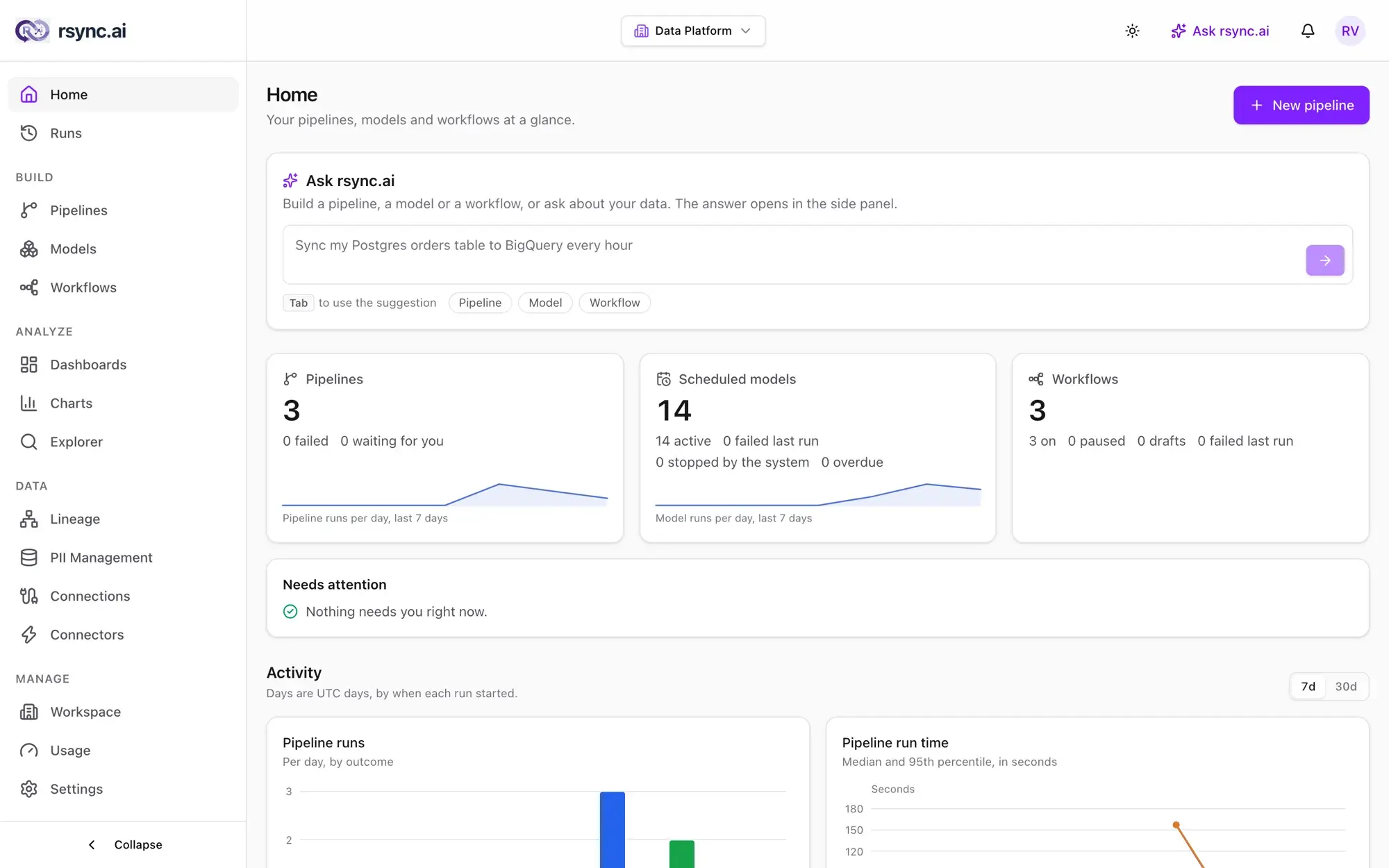
Home opens on Ask rsync.ai. Describe a pipeline, a model or a workflow — or ask about your data — and it drafts the work for you to review. Below it, a single view of what needs attention and how your pipelines have been running.

  • Drafts pipelines, models, workflows, dashboards and SQL from a plain-English request
  • Reads your metadata, not your data — no rows, credentials or personal data go to the model by default
  • Nothing is saved or run until you confirm it
app.rsync.ai
rsync.ai Ask rsync.ai — Start with a question, not a form
What rsync.ai actually does

Everything a data team needs.
Cloud-hosted. Live in minutes.

rsync.ai gives analysts, ops leads, and data heads a full pipeline platform — natural-language setup, real CDC for relational sources, PII detection, models, workflows, charts and dashboards, and AI-generated connectors for any API on rsync.ai Cloud.

Plain English

Anyone on your team can build pipelines

Your analyst, ops lead, or PM can create a data pipeline by chatting with rsync.ai. The LLM agent breaks the request into steps — no SQL, no YAML, no DAG editors.

Human oversight

You approve, AI executes

The agent stops and asks whenever your request leaves something open, and no pipeline is created or started until you confirm the plan — tables, PII rules and schedule included.

AI Tool Generator

AI builds the connector you don't have

On rsync.ai Cloud, paste an API docs URL or OpenAPI spec. rsync.ai reads it and generates a versioned connector — an MCP server under the hood — with auth, schema discovery and pagination, shipped as a Docker image in minutes.

CDC + scheduled

Real-time CDC for Postgres, MySQL, SQL Server & MongoDB

Log-based change data capture (Debezium) for Postgres, MySQL, and SQL Server, plus MongoDB change streams, keeps destinations in sync continuously. SaaS sources sync on a schedule you describe in plain English.

Observability

See exactly what's happening, always

Live row counts, run history, error alerts, and OpenTelemetry traces (SigNoz integration included). Every run keeps its history, so you can see what happened in any past run.

Models

Models keep your tables up to date

Turn a SQL query into a table that rebuilds itself — on a schedule, or when what it reads has been refreshed. Scheduled SQL passes an approval gate, and every model keeps a version history and data checks.

Workflows

Reports and alerts on a schedule

Run a query, check a condition, and send a message, chart or dashboard to Slack or email — on a cron schedule or after a pipeline. Ask rsync.ai drafts it, you test it, and no model is called when it runs.

Charts & dashboards

Charts and dashboards, built in

Draw a model or saved query as a bar, line, area, heatmap, scorecard or table, then put charts on a dashboard with up to four filters. Every tile is read live, as the person looking, and shows how fresh its model is.

Ask rsync.ai

Ask rsync.ai, then run it in the Explorer

Ask in plain English and get answers from your schemas, pipelines and runs, or a drafted pipeline, SQL, workflow or dashboard. SQL is marked Not run until you open it in the Explorer — where personal columns are masked in previews.

Agent gateway

Connect your AI tools over MCP

rsync.ai runs an MCP server. Claude Code, Cursor, Gemini CLI or any MCP client can read your pipelines, runs and schemas and draft pipelines, workflows and dashboards for you to review — scoped tokens, metadata only, every call audited.

PII protection

PII rules set before a single row moves

rsync.ai scans your columns for likely personal data — emails, phones, IDs, addresses — and asks for per-field rules before data lands. Choose mask, hash (SHA-256/HMAC), drop, or pass-through.

Source-available

Self-hosting in your own VPC

Run it in your own VPC on Docker Compose (Kubernetes with Helm is in preview), source-available under the rsync.ai Source-Available License, with AES-256 encrypted credentials and Ollama for fully local LLM inference.

Multi-tenant ready

Per-pipeline namespace isolation

Each pipeline writes into its own destination schema (e.g., shopify.orders, shopify_brand_b.orders) with collision detection and ownership checks, so one team's sync can't overwrite another's.

Blob passthrough

Move any file format between cloud storage

Byte-identical file copy between S3, GCS, and Azure Blob — PDFs, images, Parquet, video, any binary. No parsing, no re-encoding. SHA-256 integrity check on every transfer and a metadata catalog tracking name, size, mime type, and last-modified for incremental re-sync.

Curated connectors · generate any other

Connect what you actually use

Curated connectors for the databases, warehouses, files, and SaaS tools most teams need — each one an MCP server any LLM can call as a tool. Need a niche API? On rsync.ai Cloud, the AI Tool Generator builds a versioned connector from any REST, GraphQL, or OpenAPI docs URL in minutes.

Databases — real-time CDC: Postgres, MySQL, SQL Server & MongoDB
Storage & files — blob passthrough: S3 · GCS · Azure Blob
Cloud warehouses — BigQuery & Databricks live, Snowflake & Redshift in preview
BigQueryDatabricksSnowflakeRedshift
SaaS & APIs — Shopify live, Stripe & GitHub in preview
ShopifyStripeGitHub
Don't see your connector?

On rsync.ai Cloud, point the AI Tool Generator at any REST, GraphQL, or OpenAPI docs URL and it produces a versioned connector in minutes — auth, schema discovery, cursor pagination, and a Dockerfile included. You review it before it runs.

Generate a connector

Built for teams that care about security & control

AI doesn't move your data silently. Schema changes are surfaced, PII is flagged, and every plan is confirmed before it runs — on Temporal, Debezium and Kafka, with audit-friendly logging and encryption you can verify.

Cloud or your own VPC
Start on rsync.ai Cloud with nothing to deploy, or self-host inside your own VPC — on a single VM with Docker Compose, or on Kubernetes with Helm (in preview). Source-available under the rsync.ai Source-Available License.
AES-256 encryption at rest
Every connector credential is encrypted with AES-256-GCM at rest. Key rotation supported, and self-hosted deployments hold the encryption key themselves.
Nothing moves without your approval
No pipeline is created or started until you confirm the plan. Review the tables, PII rules and schedule before a single row syncs.
Schema changes are on the record
New columns and type changes are applied and recorded. A dropped column stays in your destination and is recorded, and a dropped table waits for a person — no silent deletes.
OpenTelemetry tracing
Every pipeline run emits structured traces (SigNoz dashboard included), and every run keeps its history on durable Temporal workflows.
PII rules before data moves
The scanner flags likely emails, phones, IDs and addresses. You set per-field rules — mask, SHA-256/HMAC hash, drop, or pass-through.
No per-row pricing, ever
No per-MAR, per-row, or per-connector fees — you're billed on data moved (GB): each plan includes a monthly GB allowance. Start with a free month (10 GB included), and pipelines pause at your cap, so there's no surprise bill.
Why teams pick rsync.ai

Real pipelines, built in minutes — not sprints

No connector tickets, no per-row invoices, no DAGs to babysit. Describe the sync and rsync.ai does the engineering.

~5 min
From chat to first synced rows
Describe the sync in plain English — rsync.ai provisions the connector, maps the schema, and moves your first rows. Nothing to install.
Zero
SQL, YAML, or DAGs to write
An LLM agent turns your request into a Temporal workflow — you confirm the plan, it does the wiring.
18
Connectors in the catalog
Databases, warehouses, object storage and SaaS APIs (a few in preview), plus an AI Tool Generator on rsync.ai Cloud that builds a connector for any REST or GraphQL API in minutes.
Log-based
Real-time CDC, not polling
Change data capture reads the database log, so Postgres, MySQL, SQL Server, and MongoDB changes stream to your destination continuously.

Questions people ask about rsync.ai

What is rsync.ai?

rsync.ai is an AI-native data pipeline platform. You describe what to sync in plain English; an LLM agent discovers the schemas, scans for likely personal data and drafts a plan. Nothing is created or started until you confirm it, and then the pipeline runs as a durable Temporal workflow. Once the data lands you can shape it with Models, query it in the SQL Explorer, chart it, put it on a dashboard, and schedule reports and alerts to Slack or email, all in the same product. Use it as a managed cloud at app.rsync.ai, or self-host it free for internal use: it's source-available under the rsync.ai Source-Available License at github.com/rsync-ai/rsync.ai.

Which connectors does rsync.ai support?

The catalog has 18 connectors. PostgreSQL, MySQL, SQL Server and MongoDB stream changes with real-time CDC. BigQuery and Databricks are live warehouses; AWS S3, Google Cloud Storage and Azure Blob Storage cover object storage; Google Sheets and Shopify cover SaaS. Oracle, ClickHouse and Notion are in the catalog too, and Snowflake, Redshift, Stripe and GitHub are in preview. For an API that isn't in the catalog, the AI Tool Generator on rsync.ai Cloud builds a versioned connector from its REST, GraphQL or OpenAPI docs in minutes, with auth, schema discovery and pagination included.

Can I build dashboards and scheduled reports in rsync.ai?

Yes. A model turns a SQL query into a table that rebuilds on a schedule or when what it reads has been refreshed. A chart draws a model or saved query as a bar, horizontal bar, line, area, heatmap, scorecard or table, and a dashboard puts charts and text on one live page with up to four filters. A workflow runs a query, checks a condition, and sends a message, chart or dashboard to Slack or email, on a schedule or after a pipeline. Ask rsync.ai, or your own AI tool over the agent gateway, can draft a workflow or dashboard, and you review it before it is turned on.

Can I connect Claude Code, Cursor or another AI tool to rsync.ai?

Yes. rsync.ai runs an MCP server, the agent gateway. Claude Code, Cursor, Gemini CLI and other MCP clients connect with a scoped, expiring token and can read your pipelines, runs, schemas and models, and draft pipelines, workflows and dashboards for a person to review. It returns metadata, not row values, and every call is audited. On a self-hosted install the gateway ships switched off until you turn it on.

Can I self-host rsync.ai?

Yes, or use the managed cloud. rsync.ai Cloud is live at app.rsync.ai with nothing to deploy. To self-host, install the stack in your own VPC with Docker Compose in one command (curl -sSL https://raw.githubusercontent.com/rsync-ai/rsync.ai/main/install.sh | bash); a Kubernetes install with Helm is in preview. Self-hosting is free for your company's own internal use under the rsync.ai Source-Available License. Credentials are AES-256 encrypted at rest with a key you control, and Ollama is supported for fully local LLM inference. AI connector generation is available on rsync.ai Cloud only.

Does rsync.ai support real-time data sync?

Yes, for databases. rsync.ai uses log-based change data capture (Debezium) for PostgreSQL, MySQL and SQL Server, plus change streams for MongoDB, so changes reach your destination continuously instead of on a polling schedule. SaaS sources such as Shopify sync on a schedule you choose, as often as every minute.

How does rsync.ai handle PII and sensitive data?

Before data moves, rsync.ai scans your columns for likely personal data (emails, phone numbers, IDs, addresses) and suggests a rule for each field. You choose mask, hash (SHA-256 or HMAC), drop or pass-through, and the rules apply on every run before data lands. The Shopify connector also leaves customer PII out of its default GraphQL queries.

What's the difference between rsync.ai and Fivetran or Airbyte?

Fivetran is a closed-source managed service that bills on Monthly Active Rows. Airbyte has a large connector catalog that you configure connector by connector, and its self-managed version now runs on Kubernetes (abctl or Helm). rsync.ai starts from a plain-English request: the agent discovers schemas, proposes PII rules and a schedule, and builds nothing until you confirm the plan. It bills on GB moved, not rows, runs as a managed cloud or self-hosted, and on rsync.ai Cloud it can generate a connector for an API that isn't in the catalog. Models, charts, dashboards and scheduled reports are built in.

Who is rsync.ai for?

Data teams that want Fivetran- or Airbyte-style pipelines they can also run on their own infrastructure, analysts and ops leads who would rather describe a sync than script one, AI engineers who want their AI tools to reach pipelines over MCP, and smaller companies that can't justify per-row ETL pricing. If you can describe a sync in a Slack message, you can run it on rsync.ai.

Your first pipeline,
live in minutes.

Sign up for rsync.ai Cloud and describe your first pipeline in plain English. You get real CDC, PII scanning and 18 curated connectors, plus models, charts, dashboards and scheduled reports on the data that lands, with no infrastructure to manage. Prefer your own VPC? Self-host free for internal use under the rsync.ai Source-Available License.

curl -sSL https://raw.githubusercontent.com/rsync-ai/rsync.ai/main/install.sh | bash
✓ Live in minutes — nothing to deploy✓ Credentials AES-256 encrypted at rest✓ Billed on GB moved — no per-row pricing✓ Self-host free for internal use